Wednesday, June 8, 2011

Exam Revision

Object Orientation

Interrogative message - asks the target object to reveal something, e.g. what is the current balance of the savings account. The target object is obliged to respond to the sender
Informative message - tells the target object something of interest, e.g. stock levels have fallen below 200. The target object does not respond to the sender, however it may do something in response to the notification (e.g. order more stock)
Imperative message - requests the object to take some action on itself / another object / the environment around, e.g. asking an ATM object to dispense cash


The 'this' reference
The keyword 'this' refers to the object which is executing the statement at that point in time (i.e. self).
E.G in a constructor, 'this' refers to the object which is being constructed.


Object Relations

A link is a connection between object instances
An association is a connection between classes -  an association is an abstraction of all likely links.


Wrapper Classes

ArrayList class can only refer to a collection of object type - it cannot refer to a collection of a primitive type, e.g. int
The Wrapper Class exists to allow a primitive type variable to behave as if it is an object, e.g. converting itself to a different format, or passing it as a parameter to a method expecting an object.
Each primitive data type has a corresponding wrapper class. All classes are public final, i.e. they cannot be extended.

Auto boxing
Primitive type data is automatically converted to object type when required via the auto boxing process. The reverse process (i.e. obtaining a primitive value with the same value as the wrapper objects) is known as auto unboxing.
Auto boxing occurs when inserting primitive type data into an Arraylist, and auto unboxing occurs during access to the ArrayList.

Inheritance
  • Technique for reusing existing classes as the basis for defining new classes, which add additional behaviours, or which modify the existing behaviours of an additional class
  • The class used as the bases is the superclass
  • The class which extends the superclass is the subclass
  • e.g. Employee is the superclass, Programmer and Team Leader are the subclasses
  • Inheritance introduces a form of coupling, as the subclass is affected when the superclass is changed
Generalisation
Taking a group of classes, determining commonality, promoting commonality to form a superclass, which is a general form of the existing classes

Specialisation
Developing a new class based on an existing class, i.e. creating a special form of the existing class

Overriding Methods
Write a new implementation of a method defined by an ancestor class (superclass, or the superclass' superclass). Overriding is where the method has the same set and order of parameters as the ancestor class.

Polymorphism

The principle that behaviour can vary in response to a message being sent to an object through a reference variable, depending on the actual type of object which the variable is referring to at the moment the message is received.

e.g. in the bank system, until the program is run (compile time) and the user selects the bank account, the withdraw method may vary

A polymorphic variable is a reference variable which is capable of referring to objects of a variety of types. The restriction is that the types to which it may refer must be descendants of the class type used in the declaration e.g. BankAccount currentCustomerAccount;
i.e. only objects of type BankAccount or any of it's subclasses may be assigned to the variable

Protected Access Modifier

Things which are marked as protected are accessible to any class in the same hierarchy - i.e. all ancestors and subclasses

Exception Management

Check Exceptions - Invalid conditions outside the control of the program, such as user input
Unchecked Exceptions - Defects / bugs in the program, i.e. logic errors

Wednesday, March 30, 2011

Week 4 Tutorial marked

The week 4 tutorial was due today (see this entry for what was required)

I spent a decent amount of time of this tutorial, and I found implementing Date objects to be quite obtuse. My main struggle was how to find the number of days between the endDate and today. Google taught me that, although there wasn't a Date.subtract method, there was a Date.add method, and you can pass a negative date to subtract. Except that didn't really help me work out how many days that was.

In the end, I subtracted one Date from the other, and, as they are both stored in milliseconds, I divided by (1000 * 60 * 60 * 24) (milliseconds to seconds, seconds to minutes, minutes to hours, hours to days). Although not very elegant, it was the same as Eddie's solution, so correct.

I didn't get much satisfaction out of that. I want my solutions to be nicer than that. Oh well!

Anyway, I got 10/10 again, which is good. I'm hoping to get really good marks for the assessment and assignments, as I'm a bit worried that the exam is worth 60% overall.

Tuesday, March 29, 2011

Interfaces

Here's a UML diagram of this week's tutorial discussion:


public void test()
{
    System.out.println("Enter ID");
    int id = scanner.nextInt();
    Employee employee = findEmployeeById(id);
    displaySalary(employee);
}

public void displaySalary(Programmer programmer)
{
    System.out.println(programmer.calculateSalary());
}

public void displaySalary(TeamLeader teamLeader)
{
    System.out.println(teamLeader.calculateSalary());
}


I need  to change the test method as follows:

public void test()
{
    System.out.println("Enter ID");
    int id = scanner.nextInt();
    Employee employee = findEmployeeById(id);
    displaySalary(employee);
    if (employee instanceof Programmer)
      System.out.println ((Programmer)employee.calculateSalary());
    elseif (employee instanceof TeamLeader)
      System.out.println ((TeamLeader)employee.calculateSalary());
    elseif (employee instanceof Cleaner)
      System.out.println ((Cleaner)employee.calculateSalary());
}


This isn't very good, because it's not very scalable. Every time a new class is created, it will need to be extended.

This is when interface comes in handy. Very little goes in the interface, the implementation is specified in the classes that implement it.

public interface SalariedWorker
{
    double calculateSalary;
}

public class TeamLeader implements SalariedWorker
{
    public double calculateSalary()
    {
        return 100 * 100
    }
}

public class Programmer implements SalariedWorker
{
    public double calculateSalary()
    {
        return 50 * 50
    }
}


Now I need to change my test method to implement the interface

public void test()
{
    System.out.println("Enter ID");
    int id = scanner.nextInt();
    Employee employee = findEmployeeById(id);
    displaySalary(employee);
    if (employee instanceof SalariedWorker)
      displaySalary((SalariedWorker)employee);
    else System.out.println("The employee is not a salaried worker");
}


And that's how to use interfaces.

My thoughts:
This makes sense to me, it's a much nicer way to determine if the subclass has a method. I haven't used instanceof before, I was wondering how you check what type of subclass something is.

Monday, March 28, 2011

I has an audience

Apparently I has an audience now (and in order news, I'm talking like a lolcat):


Sure, it's not many, but given that this is my first attempt at blogging in a long time, it's nice to know someone's reading. Perhaps it's time for a System.out.println("Hello World!"); joke. Or perhaps that's just lame.

Sunday, March 27, 2011

Formatting Date objects

I'm creating dates for my assessment - storing the start date and end date for a contractor's employment.

To print out the date, must use the SimpleDateFormat class, which will format the date to make it more readable.


public String toString()
{
SimpleDateFormat dF = new SimpleDateFormat("dd/MM/yyyy");
String theEnrolledDate = dF.format(enrolledDate);

return super.toString()
+ "/nEnrolled Date: " + theEnrolledDate
}

I've been having some issues with passing a date into a constructor, but I re-read an email from my tutor and it makes sense now (thanks Eddie!)

Constructor:


public Student(Date enrolledDate)
{
this.name = null;
this.id = idCounter++;
this.enrolledDate= enrolledDate;
}


Creating an instance of Student:
Student s1 = new Student(new GregorianCalendar(2011, 0, 3).getTime());


Just need to put the dates in, and remember that month is counted from 0, not 1.

UPDATE
Make sure that the values are initilised. SimpleDateFormat does not work when the date is null. It spits exceptions that don't make sense.....

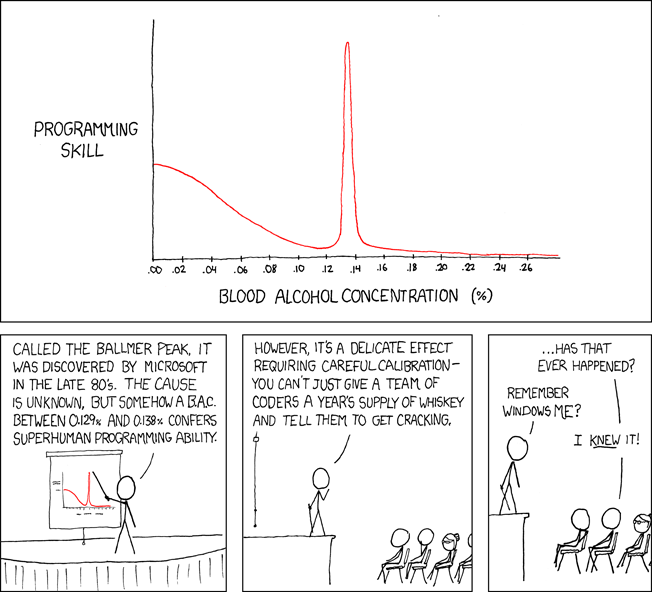
In other news, wine is helping me with my coding. Lets just hope I don't go over Ballmer's Peak. Where's a breathalyser when I need one?

Tuesday, March 22, 2011

Java Date and Calendar objects

I hate dates in Java. I've been trying to understand how dates work for the last hour or so, and I think I understand it, and I think it sucks.

For my current assessment (see prev blog entry), I have to store a start date and end date for (some) of my employees. Eddie's suggestion is to store the startDate and endDate as type Date, and create an instance of Calendar for any calculations.

As far as I can work from the limited examples in the lecture, this is the easiest way to have a date (I'll use the previous example of Student, Unit, University, as I'm pretty sure I shouldn't blog about what's going in my assessable work!). There's nothing in the study guide or the textbooks about dates, stupid lack of reference material.

To create a Date or Calendar object, you need to import the classes - they're both in java.util.*

import java.util.Date;
import java.util.GregorianCalendar;

public class Student
{
 private String id;
 private String name;
 private int age;
 private Date enrolledDate;

 public Student()
 {
 id = "";
 name = "";
 age = 0;
 GregorianCalendar calendar1 = new GregorianCalendar();
 calendar1.set(2011, 1, 28, 9, 0, 0);
 enrolledDate = calendar1.getTime();
 }


 public Student (String id, String name, int age, int enrolledYear, int enrolledMonth, int enrolledDay)
 {
 this.id = id;
 this.name = name;
 this.age = age;
 GregorianCalendar calendar1 = new GregorianCalendar();
 calendar1.set(enrolledYear, enrolledMonth, enrolledDay, 9, 0, 0);
 enrolledDate = calendar1.getTime();
 }

 ...
}


I DON'T LIKE THIS! It just feels pointless. Why do I have to have both a Date and a Calendar.

Could I do this with just a calendar? Is there any reason to use the Date?

Assessments suck.

Oh, and the Calendar object sucks too - for the Day of Month and Year, you enter them correctly, but for Month, you start counting at 0 (such a java thing), so January is 0. So to create the date 01/01/11, it's calendar.set(2011,0,1).

grrrr.

UPDATE: I think I found a better way to do the date thing

public Student()
{
 id = "";
 name = "";
 age = 0;
 this.enrolledDate = new GregorianCalendar(2011, 0, 3).getTime();
}


It looks much simpler...

Week 4 Tutorial

Overview:
In this week’s exercise, you are implementing additional behaviour for the company to make use of the new concepts of inheritance and polymorphism. You will extend the program to allow for two different types of employees: TeamLeader and Programmer.

Each team leader has an annual salary. He/she is also being paid for overtime work based on the salary rate.

Every programmer is on contract. He/she maintains a contract start date and a contract end date. As a contract worker, he/she is being paid hourly given a salary rate.

Every employee is paid superannuation on top of the salary. For the programmers, the superannuation is 5% (0.05) of the salary. For the team leaders, it is 10% (0.1).

Tasks:
  1. Create two new classes TeamLeader and Programmer, which inherit from the Employee class, based on the overview description above. Include in each class: 
    • a constructor with default values,
    • at least one constructor with parameters,
    • corresponding accessor and mutator methods for ALL attributes; and
    • a toString method, which returns a string of object’s details
  2. In the TeamLeader class, provide one additional method: 
    • CalculateSalary, which takes an integer as a parameter. The parameter represents the number of overtime hours worked per month. The method returns the total salary earned per month. The formula is:
      Monthly salary = annual salary/12 + number of overtime hours per month * salary rate
  3. In the Programmer class, provide two additional methods
    • noOfDaysLeft, which takes no parameter and returns an integer. The formula for number of days left on the contract is:
      Number of days left = Contract end date - Current date 
    • CalculateSalary, which takes one integer parameter representing the number of hours worked per month and returns the salary:
      Monthly salary = number of hours per month * salary rate
  4. For all employees, provide a method to calculate the superannuation amount per month. The formula is:
    Monthly superannuation = monthly salary * rate
  5. In the main method of the Company class,
    • Create a number of team leaders and programmers and add them to the ArrayList of employees (Polymorphism!)
    • Create a number of teams and projects, based on the team leaders and programmers created.
    • Print the detailed information of all employees including their monthly salaries and the corresponding monthly superannuations. For each programmers, display also the number of days left in his/her contracts

Hint: Use the super keyword where appropriate

Sunday, March 20, 2011

Week 3 Lecture - Part 2

Ok I'm a bit behind, so here's what else was covered in the lecture that I haven't blogged yet
  • Object Relations:
    • Associations between objects (uni-directional & bi-directional association)
    • Aggregation & Composition
    • Dependency


Associations between objects
  • If 2 objects from different classes have a reference that lasts beyond the current method, there is a link between the objects
  • The driver class, containing main(), establishes links between itself and the objects it creates.
  • If we know at the time of design that the objects of 2 (or more) different classes will have lasting links, there is an association between the two classes. A link is the realisation at run time of an association between specific instances of the classes.
  • If an object needs to send a message to another object of the same class type, it has a self-referencing association
  • If an association is implemented as a permanent link between two objects, and neither of the objects can be substituted by another object, the association is immutable.
    • If one of the objects can be substituted for another object, the association is mutable.
  • In uni-directional systems, objects sending messages maintain references to the objects that receive the messages (linked objects). This can be done with constructors / mutators
  • A bi-directional association is when both objects know of each other and are linked to each other.
    • Both objects must maintain references to each other
    • Both ends of a bi-directional association must be updated simultaneously
      • Have to instantiate the other class with a default constructor, use a mutator method to update the reference variable (creating the link between the two classes)
    • The class with a reference variable in it's constructor takes responsibility for maintaining the association, by sending a message from it's constructor asking the other class to update it's reference variable (using the 'this' variable)
      Example from this week's sample program:
      public Player(String name, Team team, int birthYear, int birthMonth, int birthDay)
      {
      this.name = name;

      this.birthYear = birthYear;
      this.birthMonth = birthMonth;
      this.birthDay = birthDay;

      setTeam(team); // Establish the bi-directional link of this player to that team.
      }
Aggregation & Composition
  • Aggregation is a strong form of grouping where similar objects are grouped together into one class 
    • a gaggle of geese is an aggregate of geese
  • Individuals which make up the aggregate can exist independently of the aggregate, and may be involved in several associations
  • Composition is a form of association where components are an integral part of the composite's being- the composite cannot exist if it doesn't have some of it's components. The components can only be part of one composite at any one time.
    • A toothbrush is not a toothbrush without the bristles, handle, etc, and the bristles, handle, etc cannot be on more than one toothbrush at a time.
  • In Java, aggregation & composition are implemented the same as simple association
    • Component classes are declared as reference variables inside aggregate or composite classes


My learnings:
  • The assessments we have centre around building a human resource management systems, and I feel all of this uni/bi-directional association is a hack to re-create a database. I don't understand why we'd create methods to store employee details - wouldn't you want to create a database, store the information in the database, and use Java to create a GUI to enter the data? When does logical program design get covered?
  • The first 3 weeks of Java are covered in 132 pages of my study guide, which is 47% of the book, whereas this is only 27% of the course (11 weeks + 1 week of break + 1 week of revision). It feels like a lot has been crammed into the "revision" section.
  • Although we've flicked all over the textbook, so far I've read 260 pages. Ignoring all the appendixes, index, solutions, etc, the textbook is less than 1000 pages, so I've already read more than a quarter of it. Which means that the textbook reading is much better paced - there's enough time to read the whole book.
  • There's too many references to things I haven't learnt yet, such as "cloning" objects (Interfaces will be in Module 5), Exceptions, and, uh, I can't remember what else. Why do I need to be told about useful things that I haven't learnt yet?? 
  • It's all starting to sink in. Java is making more sense this time than when I did Computer Programming 1. That's a start :-)

Saturday, March 19, 2011

Revision of Arrays

Useful Methods of the Array Class

Method Description
copyOf(array, newSize) returns a copy of the array with the given size
copyOfRange(array, startIndex, endIndex) returns a copy of the selection specified of the given array - from startIndex (inc) to endIndex (excl)
equals(array1, array2) returns true if the arrays contain the same elements
fill(array, value) sets every element of the array to the given value
sort(array) rearranges the elements of the array so they appear in non-decreasing order
toString(array) retuns a String representation of the array, as in [3, 5, 7]
... ...


So the way to compare Arrays is the same as comparing Strings - instead of using ==, you need to use Arrays.equal. I assume this is true for everything that isn't a primitive data type.


Wednesday, March 16, 2011

It's harder to make a mistake in Java

It's harder to make a mistake in Java!
http://www.theregister.co.uk/2011/03/12/facebook_hacker_cup_kicks_off/

I'd love to know where to start with these problems! I don't feel like I have skills to design the required algorithm  - having a look at the solutions, they're not overly long. Will have to read them in more detail when I have time.

Tuesday, March 15, 2011

Week 3 Lecture - Part 1


Notes from Week 3 Lecture.
Subjects covered in lecture:
  • ArrayList
  • Wrapper Class
  • Principles for designing classes
  • Object Relations:
    • Associations between objects (uni-directional & bi-directional association)
    • Aggregation & Composition
    • Dependency

ArrayList
Overview
  • is a Class, ie create objects from it
  • dynamically add more objects
  • remove objects
  • declaration of an ArrayList object requires specification of the type of objects in the list
    Private ArrayList<Dog> myPets;
  • initiation of the ArrayList also requires special syntax
    myPets = new ArrayList<Dog>();
  • Initially, ArrayList is empty
  • The index will change is elements earlier in the list are removed (ArrayList is dynamic)
Line 1 Col 1Line 1 Col 2
ActionCodeComments
Adding elementsmyPets.add(dog321);Add dog321 to end of list
Adding elementsadd(index, value);
eg myPets.add(2,scotty99);
Add the given value at the given index and shifts all subsequent values right
Retrieving elementsmyPets.get(3);Retrieve dog object added fourth
Set elements myPets.set(2, dog55); Update 3rd element to be dog55
Remove elementsmyPets.remove(dog321);Removes dog321 and returns true if successful
Remove elementsmyPets.remove(1);Removes dog added 2nd and returns true if successful
Clear ArrayList myPets.clear(); Removes all elements from the list
Size of ArrayListSystem.out.print( myPets.size() );Prints the number of elements in a list
Check for elements myPets.contains(dog321); Returns true if element is in ArrayList
First index myPets.indexOf(dog99); Returns first index of given value, -1 if not found.
Last index myPets.lastIndexOf(dog99); Returns the index of the last occurrence of value, -1 if not found
Iterating through an ArrayList for (int i=0; i < myPets.size(); i++)
{
 myPets.get(i).bark(2);
 System.out.print(myPets.get(i);
}
Make each dog bark twice and print dog
Enhanced Loopfor(Dog d : myPets)
{
 d.bark(2);
 System.out.print(d);
}
for every dog D found in the ArrayList myPets

Comparison of Static Data structures vs Dynamic Data Structures:
Static Data StructuresDynamic Data Structures
eg a plain arrayeg a Java ArrayList
size is fixedsize grows and shrinks as required
easy to set up & manipulatemore complicated to manipulate
not always flexibleMore flexible
not always efficientOften faster for large amounts of data

The lecturer then went on to say that an ArrayList is actually an Array, and everytime you add/remove elements to the ArrayList, a new Array is created and the ArrayList points to that, so this may cause issues, but it's not something we're going to cover. Or something like that - I'm going to listen to the recording to double-check what he said. I'm not a fan of lectures going into details that aren't covered in the lecture material / study guide / textbook because I can't read it later!!

Wrapper Class
  • Sometimes a primitive type variable needs to behave as an object
    • eg converting to a different format
    • eg being passed as a parameter to a method expecting an object
  • Each primitive data type has a wrapper class:
    Integer, Short, Long, Float, Double, Character, Byte and Boolean
  • All are public final - cannot be extended
  • Each Wrapper class has 2 constructors (except for Character wrapper class):
    • Integer(5) returns an Integer object with value 5
    • Integer("45") returns an Integer object with value 45
  • Tedious to convert back-and-forth, which is where autoboxing and unboxing come into it
ArrayList elements must all be objects. int is not an object, hence cannot be inserted into an ArrayList.
Before JDK 5

ArrayList integerList = new ArrayList();
int number = 42;
integerList.add(new Integer(number));
...
Integer anInteger;
anInteger = (Integer)integerList.get(2);
int myNumber = anInteger.intValue();


After JDK 6

ArrayList <Integer> integerList;
integerList = new ArrayList<Integer>();
int number = 42;
integerList.add(number);   //int autoboxed into Integer object before adding to ArrayList
...
Integer anInteger;
anInteger = integerList.get(2);
int myNumber = anInteger;  //After getting Integer out of ArrayList, int is auto unboxed from Integer


Thoughts:
  • I can see how an ArrayList is useful - re: assignment, you may not have a fixed number of programmers in a team, etc.
  • Why would I use an Array when I could use an ArrayList? Apart from not having to worry about primitive type variables.
  • I'm not sure when I'll use autoboxing/unboxing - when would I need an ArrayList of primitive type variables? Nonetheless, it's useful to know in case I need this later.

Monday, March 14, 2011

Feedback from Assessement 1

  1. My default constructor for Team created a new Employee for the team leader. Do I really want a new Employee each time I create a new Team with no details (answer: unlikely). Therefore, I should change the default constructor to set the new teamLeader to null
  2. If I change the default constructor, my toString method will fail anytime there is a null teamLeader.
  3. I need to modify my getTeamLeader method to check if the teamLeader is null, and if so, return a String "no team leader assigned" (or equiv)
  4. I also need to double-check my code for typos and accidential capitilisations which will just cause confusion!
All in all, it was a good first assessment, especially because I received full marks.

:)

Wednesday, March 9, 2011

Compiling my assignment via the command prompt

I wrote my assignment in Eclipse. I'm really enjoying Eclipse, apart from it's unfortunate name-in-common with a certain teen-vamp flick (at least Eclipse IDE came up higher on Google search that Twilight Eclipse).

The only issue with writing my assignment in an IDE is that we're meant to start writing java in txt files only, and make sure they compile in the command prompt to ensure the IDE isn't assisting when things fall over. It also makes one pay more attention to all the curly brackets and semi-colons when the IDE isn't automatically highlighting mistakes...

Compiling and Running a Java Program from the Command Prompt:
  1. Check that JDK is installed.
    (Somehow I didn't have this installed, I thought that I did, given that Eclipse could compile my programs. Maybe I did have it installed and it was just in a non-default location)
  2. Install JDK
  3. Create a temporary folder C:\Uni (or whatever you want to call it). Copy and paste the .java files into this folder
  4. Run Command Prompt (Start > Run > Cmd) Type "cd \uni" to navigate to the directory
  5. Run javac Company.java and get a funky error: 'javac is not recognized as an internal or external command, blahdy blah blah (why can't the language settings in Windows override the spelling of error messages, so I see "recognised" rather than "recognized"?)
  6. To tell the system where to find javac and all the other wonderful JDK programs that we installed in step 2, run set path=%path%;C:\Program Files\Java\jdk1.6.0_24\bin\ or whatever the path is. Make sure you include the semi-colon between set path = %path% and the directory, otherwise it doesn't work. NB: There's nothing to indicate this was successful, just the system prompt being displayed again...
  7. Run javac Company.java again. Once again, there's nothing to display that this was successful, just the next system prompt.
  8. Run dir to see what's in the directory. Lo and behold, there's some new files - all my .java files now have a .class file
  9. Run the .class file with the main method by running main Company (no .class or .java required
This is what my command prompt session looked like:

C:\Documents and Settings\mel>cd \uni

C:\uni>javac Company.java
'javac' is not recognized as an internal or external command,
operable program or batch file.

C:\uni>set path=%path%;C:\Program Files\Java\jdk1.6.0_24\bin\

C:\uni>javac Company.java

C:\uni>dir
 Directory of C:\uni

09/03/2011  10:34 PM    <DIR>          .
09/03/2011  10:34 PM    <DIR>          ..
09/03/2011  10:56 PM             1,578 Company.class
09/03/2011  09:51 PM             2,017 Company.java
09/03/2011  10:34 PM             1,451 Employee.class
09/03/2011  09:57 PM             2,501 Employee.java
09/03/2011  10:34 PM             1,667 Team.class
09/03/2011  09:41 PM             2,868 Team.java
               6 File(s)         12,082 bytes
               2 Dir(s)   9,604,157,440 bytes free

C:\uni>java Company
[Team Name]: Team Awesome!!
[Team Leader]
ID: 1003
Name: Melissa Jones
Hourly Salary Rate: 90.0

[Programmer List]
ID: 1001
Name: Cameron Lawson
Hourly Salary Rate: 77.0

ID: 1002
Name: Carly Rodwell
Hourly Salary Rate: 45.0

ID: 1004
Name: Kimberley Phillips
Hourly Salary Rate: 44.0

ID: 1005
Name: Liam Garde
Hourly Salary Rate: 33.0

ID: 1006
Name: Dan McNaulty
Hourly Salary Rate: 32.0

ID: 1007
Name: Louise Latz
Hourly Salary Rate: 12.0

[Team Name]: Team of Champions
[Team Leader]
ID: 1008
Name: Tom Caley
Hourly Salary Rate: 54.0

[Programmer List]
ID: 1009
Name: Nick Bellas
Hourly Salary Rate: 63.0

ID: 1010
Name: Angela Turnour
Hourly Salary Rate: 50.0

ID: 1011
Name: Eric Lim
Hourly Salary Rate: 60.0

ID: 1012
Name: Sanath Kumar
Hourly Salary Rate: 42.0

ID: 1013
Name: Sandeep Badwal
Hourly Salary Rate: 80.0

ID: 1014
Name: Germaine Yong
Hourly Salary Rate: 25.0


C:\uni>

Tuesday, March 8, 2011

Static / Class Variables

Following on from my last post, this is an expansion on Ben's notes of Static / Class Variables.

To have a variable that is common to all objects, the static modifier needs to be used - these fields are called static fields or class variables. They are associated with the class, rather than an object (or an instance of an object).

Eg in the tutorial example, there should be an ID number unique to each object (ie an instance variable). In order to work out what ID to assign the next Student, you need to keep track of how many Student objects have been created. As this isn't related to any individual object, but the class as a whole.


public class Student
{
private int id;
private String name;
private int age;

private static int numberOfStudents = 1000;

//default constructor
public Student ()
{
id = ++numberOfStudents;
name = "";
age = 0;
}

public static int getNumberOfStudents()
{
return numberOfStudents;
}

...
}

Class variables are referenced by the class name itself - ie Student.numberOfStudents. If you refer to it as student1.numberOfStudents, it's not clear that it's a class variable.

To access the numberOfStudents static field, the accessor needs to be declared as static as well (see above)

I found this to be a very useful explanation: http://download.oracle.com/javase/tutorial/java/javaOO/classvars.html

Reflection on Tutorial 1

My learnings:
  • The University class has a run method within it rather than in the main class as this will allow greater flexibility - eg if we require more than one university
  • If a numerical field is not going to have any calculations done on it, make it a string.
  • If you loop through an array, null records are returned - check if the array is not null, perform action, otherwise skip it and continue.
  • Convention is to use capitals for the name of a variable that is declared as final (a value that does not change. I consider this to be static, however static has a different meaning in Java).
I spent most of the tutorial struggling to keep up and write down the java code (see previous entry), so I missed some of the finer points around static vs instance variables and methods. This went right over my head. However, due to the wonder of internet forums, one of the other students (Ben) kindly posted his notes from the tutorial:

BEN'S NOTES

STATIC VS INSTANCE VARIABLES AND METHODS:Static = shared across all instances of the class. i.e. every object of that class can access the same variable.
so if private static int id=1000, if you have objects s1, s2, s3:
if s1 increments id, then s2 increments id, then id will equal 1002.

Static variable = shared across all instances of the class.
Instance variable = accessable only to that instance of the class

Static method = a method shared across all the instances of the class
you can access it from your driver, just by using the class name and a dot.
e.g. Student.getId();
Whereas an instance method can only be accessed by referencing that instance of the class
e.g. student103.getId();


THIS:
when 'this' is used in a constructor, it reference that instance of the class.

so when creating student s1:
this.name references the variable 'name' of the s1 object

when creating student s2:
this.name references the variable 'name' of the s2 object


ACCESSORS VS MUTATORS:
An accessor takes no parameters because it requires no input to complete it's code

A mutator returns nothing because it's function is to change, not to return information

Research MVC

Model, View, Control

Why we return a value from the toString method, and not just print out

While we're just using text-based applications, printing out from the toString method is fine, but it is not good if you're actually using a GUI. So returning the values is much more helpful for non-text based applications.

Student s1 = new Student();Student s1 tells the computer which memory address to use
new Student() instantiates the object and calls the constructor to set up an object of that class
AN ARRAY OF OBJECTSprivate Student[] students
this makes an array of objects of type Student, and the array is called students

ARRAYS

It is a good practice to use a constant to define the size of the array.
e.g.
private final static int MAX_NUM;
student = new Student[MAX_NUM];

ARRAYS IN METHOD RETURN VALUES AND PARAMETERS
as a return value: public Student[] getStudents ()
as a parameter: public Unit ( Student[] students )

USING .length WHEN LOOPING THROUGH AN ARRAY
.length gives you the number of how many items are in the array, so if one of those items is NULL, you're in trouble.
A good way to get around this is when looping through an array, check first if the item in the array is equal to NULL, and if it isn't, then go ahead with your action, otherwise, skip it and keep going in the loop.

Example:


public String getStudentsEnrolledDetails()
 {

  Student student = null;
  String output = "";
  for (int index=0; index < studentsEnrolled.length; index++)
  {
   student = studentsEnrolled[index];
   if(student != null)
    output += student.toString();
  }
  return output;
}


RESERVING A MEMORY LOCATION SEMANTICALLY CONNECTED TO A CLASS
You can instantiate an object over 2 lines. e.g.
Student s1;
s1 = new Student();


So you can reserve a place in memory just by:
Student s1;

Tutorial 1

This is what was covered during Tutorial 1 with Eddie.


public class Student
{
private String id;
private String name;
private int age;

//default constructor - needs to have same name as the class
public Student ()
{
id = "";
name = "";
age = 0;
}

//Constructor that accepts values
public Student (String id, String name, int age)
{
this.id = id;
this.name = name;
this.age = age;
}

//Method: getID accessor
public String getID()
{
return id;
}

public String toString()
{
return "ID: " + id + "\nName: " + name + "\nAge: " + age +"\n";
}


}


public class Unit {
private final int MAX_NO_STUDENT = 10;
private String unitCode;
private String unitTitle;
private Student[] studentsEnrolled;
//default constructor
public Unit()
{
unitCode = "";
unitTitle = "";
studentsEnrolled = new Student[MAX_NO_STUDENT];
}
public Unit(String unitCode, String unitTitle, Student[] studentsEnrolled)
{
this.unitCode = unitCode;
this.unitTitle = unitTitle;
this.studentsEnrolled = studentsEnrolled;
}
public Student[] getStudentsEnrolled()
{
return studentsEnrolled;
}
public String getStudentsEnrolledDetails()
{
Student student = null;
String output = "";
for (int index=0; index < studentsEnrolled.length; index++)
{
student = studentsEnrolled[index];
if(student != null)
output += student.toString();
}
return output;
}
public String toString()
{
return "Student List \n" + getStudentsEnrolledDetails();
}
}


public class University {
public void run()
{
Student s1 = new Student("123", "Eddie", 33);
Student s2 = new Student("124", "Cameron", 34);
Student[] studentsEnrolled = new Student[10];
studentsEnrolled[0] = s1;
studentsEnrolled[1] = s2;
Unit unit = new Unit("FIT2034","Java 2", studentsEnrolled);
System.out.print(unit.toString());
}


public static void main(String[] args)
{
University university = new University();
university.run();
}

}

Monday, March 7, 2011

Last Minute Larry

Last night (Sunday) I did 4 hours of study for Java, and I still felt like I didn't understand it
Tonight, I've done another 4 hours and I feel like I've made a small amount of progress. It's now week 2, and I'm still doing week 1's readings. Should have done more on the weekend.

I had a look at the assignment, and I've got no idea where to start. So far, I've worked all the way through Study Guide 1, I've done all the readings, I've done the self-check problems. I'm struggling on the exercises, and I find it really frustrating that there's no answers for the exercisers. I've done some googling to no avail. I feel like some of the exercises are significantly harder than the self-check problems, and it's frustrating that I can't check to see if I'm heading in the right direction. Note to future textbook writers: please make some of the exercise solutions available online...

I can't make it to the lecture tomorrow, I'm so glad the audio is recorded so I can listen later. Although there's nothing more boring than listening to a 2 hour lecture recording. I had a look at the demo program, and I cannot get it to run via command prompt - the javac command does not exist for me, and I don't know what to do.

It seems that the quickest and easiest way to complete assignment 1 is to use this week's demo program as a guide, as this is the first sample program I've seen this semester with multiple classes, constructors, accessors, modifiers, ie everything that is needed for the assignment. I think it's a good base, maybe it gives me 50% of what I need. My only concern is, in programming, when does it become plagiarising? At first glance, this assignment is basic - it's the building blocks for future assignments, and there's not too many ways to go about this. Although my scribbled notes do closely match the demo program, so maybe I just think about it the right way.

Tonight's Learnings
  • I want to make all my variables public so I know that I can access them!! Although making the variables private and creating/updating via the methods makes sense, I still don't understand why this means my variables have to be private. Maybe it'll matter further down the track.
  • I don't understand why I'd create a list of employees in a Java program. I want to create a database and connect to that. I can't think in terms of Java classes, but I can think in terms of databases. Drawing UML diagrams is helping me work out what goes in each class.

To Do
  • Update the employee ID field to be a unique ID. I'm considering having a counter starting at 1000 and increasing, and using that increment (counter++)
  • Finish creating UML diagrams

Assessment 1: Week 2 Tutorial

Tutorial Introduction
In this semester, during your tutorials, you will be developing an application managing the employees working in a computer software company.


In the subsequent tutorial exercises, every week, we will be adding new features and requirements to this application. Therefore, you need to keep a copy of your weekly solutions for future enhancement and extension.


By the end of this semester, you should have a complete application for the company, which covers most (if not all) of the theories and concepts you have learned in this unit. Please keep in mind that we will only mark your solutions for Week 2, Week 4, Week 6 and Week 9 exercises.


Description of the Company
Every employee of the company has a name and a unique 4-digit id. Each employee works a fixed number of hours per week and is paid according to a salary rate (the dollar amount earned per hour).

The company has many programming teams working on different projects. Each team has a name, and consists of a team leader and exactly six programmers. All the team members (programmers and team leader) are employees of the company.


Tutorial Tasks

  • Write a Java program consisting of the following 3 classes to represent objects in the company:
    Employee (4 marks)
    Team (4 marks)
    Company (2 marks)
  • The Employee class should have three attributes: name, id and a salary rate.
  • The Team class should have three attributes: name, team leader and programmers.
  • In the Employee class and Team class, you should also provide:
    • a constructor with default values,
    • at least one constructor with parameters,
    • corresponding accessor and mutator methods for ALL attributes; and
    • a toString method, which returns a string of object’s details
  • The Employee class should also have a method called calculateSalary. The method takes an integer as a parameter which represents the number of hours worked. It calculates the salary of the employee using the formula: salary rate x number of hours.
  • The Company class serves as the driver class. Create a number of Employee objects and Team objects in this class (as many as you wish) and print their details on the screen. A sample output for one team is shown below – after the command “java Company” is entered at the command prompt

Thursday, March 3, 2011

Week 1

Oh the joy. Uni is back, my summer holiday is over, and the Melbourne weather has reverted to its usual dreariness.

It's the end of week one. I don't normally go into uni during week 1 as there's no labs, and it's rather boring, but I had the day off work, so why not. I forgot how fun it can be - there was the usual first week sausage sizzles and free stuff. The vibe in the air felt youthful. Shame I don't feel youthful anymore - I've been studying at Monash for 5 years now.

It's been several years since I last even looked at Java, but even my lack of knowledge, and my lack of reading before the lecture didn't make it anymore interesting. I understand the logical side of programming, but I get stuck on the programming side of programming. I know I need to tell my program to expect import from a user, but I never remember how to do this.

I'm studying two subjects this semester, FIT2034 (Computer Programming 2) and FIT2001 (Systems Development). FIT2001 recommends students keep a reflective blog for both bonus marks and because, historically, students who blog perform better. I may disagree with the correlation, however I do think it is a good idea, and perhaps two blogs are better than one (or maybe I should just have one blog and tag the entries...).

This semester, I went to Officeworks and paid $25 to print and bind my unit book / study guide, and I've already noticed how much easier it's made things. Sure, it's 288 pages (well, 144 pages) that I didn't need to print, and the whole point of PDF is to avoid the need to print things, but it's so nice to be able to jot notes down. I wanted to get an iPad or eReader to avoid printing, but I don't think either of those applications have something to make notes on PDFs? Besides, there's something about writing things down that technology will never replace. For me, at least. 


Revision

  • import java.util.*; goes at the top, the very top, before the public class bit
  • To use the import from the keyboard, you need to use: Scanner console = new Scanner(System.in);
  • When comparing one String to another (eg String1 and String2), don't use ==, use String2.equals
  • A nested if/else statement is more efficient than sequential ifs
  • Even the lecturer gets confused as to what the value of i is when it looks like i++ + i + ++i
And that's up to page 33 of my study guide... Only 24 pages to go.